Backlog Management
Standardizing the management of the backlog is crucial for maintaining clear and highly actionable backlogs. It streamlines the process and enables any Product Manager on the team to comprehend a project’s backlog with minimal effort.
Without standardization, understanding the organization of a backlog becomes challenging and time-consuming for Product Managers. Consistency in backlog management ensures clarity and facilitates efficient product development.
Depending on the project and client requirements, the team use jira for backlog management.
Modules
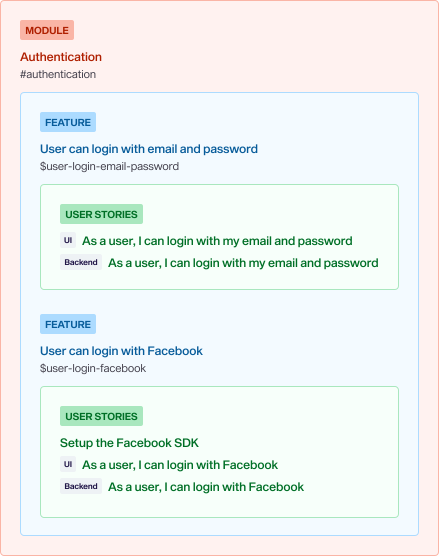
Modules represent the main components of an application. They are the smallest denominator to which an application can be reduced. Each module contains several features.
For example, most applications will need an “Authentication” module which will regroup all login and registration features.
In fact, there are several modules that are usually common to most applications: Application (the most generic module in an application), Authentication, and User Profile.
Naming & Slugs
| Example | Name | Label | Slug |
|---|---|---|---|
| Authentication module | Authentication | #authentication | authentication |
| Customer Relationship Management module | CRM | #crm | crm |
| Payment gateway module | Payment | #payment | payment |
| Push notifications module | Push Notifications | #push-notifications | push-notifications |
Module names should be as short and accurate as possible. There is no specific pattern for it and it is up to the Product Manager to identify names that fit this ideology best.
In addition to having a name, modules also need a slug for use in labels. The slug is a shorter, more condensed form of the name. Given how short module names are, the slug is typically a hyphenated version of the name.
Features
Features are coherent and standalone groups of user stories that define functionality in the application. Each feature must belong to one and only one module, establishing a hierarchical relationship between the two.
Writing a Feature
Every feature in an application has a purpose behind it. It’s essential to provide developers with sufficient information to understand the idea fully. When developers grasp the concept behind a feature, it provides them with a solid foundation to implement it effectively and align with the correct goals.
Rethinking the “Why” Approach
Traditionally, Product Managers used to include a “why” statement in each user story. However, this approach had several drawbacks:
- Repetitive Content: The “why” content was often repetitive across different implementation areas (backend, frontend, integration), leading to redundancy.
- Lack of Context: Due to the repetitive nature of the task, Product Managers sometimes failed to provide enough context, hindering understanding.
- Scattered Information: Important information about the “why” was scattered across numerous small user stories, making it challenging to grasp the overarching purpose.
Writing the “Why” at the Feature Level
To address these downsides, Product Managers now write the “why” at the feature level. This approach allows for clearer context and more efficient communication.
At the feature level, the “why” must be clear and thoroughly detailed. It should include:
- The Need for the Feature: Clearly articulate the problem the feature aims to solve.
- High-Level Solution Approach: Outline how the feature intends to address the problem (detailed implementation specifics should be documented separately).
- Relevant Context: Provide any pertinent context that may assist developers in making informed decisions during implementation, such as dependencies on other features or third-party systems.
- Links to Resources: Include links to relevant resources and documentation to support understanding and implementation.
By centralizing the “why” at the feature level, Product Managers can provide clear and concise context while optimizing their time and effort.
Naming & Slugs
| Example | Name | Label |
|---|---|---|
| Users can view the list of tickets | User can list tickets | $user-list-tickets |
| Admins can view the details of a specific ticket | Admin can view ticket details | $admin-view-ticket-details |
| Agents can create new tickets | Agent can create ticket | $agent-create-ticket |
| Agents must assign a ticket to an agent | Agent must assign ticket | $agent-assign-ticket |
| Admins can delete an existing ticket | Admin can delete ticket | $admin-delete-ticket |
The naming pattern, whenever possible, must be <user> <requirement> <action> <item> where:
<user>defines the type of user targeted by the feature.<requirement>should be one of: can, must (used to highlight a hard requirement for a user to accomplish something).<action>should be one of: list, view, create, delete.<item>defines the item that is being developed.
In Practice
Below is a complete example of a feature:
Module: AuthenticationFeature: User can login with FacebookLabels: #authentication $user-login-facebook @1.2.0## Why
As the majority of our leads come from Facebook, it is important for the mobile apps to allow users to sign in with Facebook to convert more leads into our user base.
To make this happen, we need to integrate Facebook Login which means:
- Setting up a Facebook application- Loading up the Facebook SDK- Configuring the "Login with Facebook" feature in each app- Implementing the necessary UI in the apps, including the error states
Keep in mind that Facebook will only be _one_ of the possible ways a user can "continue" (i.e., register or log into the application).
## Documentation
- Feature documentation: https://www.notion.so/cripsrcoders/feature-documentation-link- Facebook Login documentation: https://developers.facebook.com/docs/facebook-login/- Facebook Login - Technical Best Practices: https://developers.facebook.com/docs/facebook-login/best-practices#technical-practicesUser Story Types
The team uses three types of user stories, even if a given backlog management tool offers more (or customizable) types: “User Story” (called “Feature” in some tools), “Bug”, and “Chore”.