Design Review
The design review process for our team is comprehensive and ensures that all aspects of the UX/UI are thoroughly evaluated.
Objectives
- Ensure alignment with project brief and vision.
- Validate technical feasibility of design elements.
- Gather client feedback to ensure satisfaction with UX, look, and feel of the product.
What to Review, and When
Remember the UX/UI flow illustration in the “Design Process” section? The design review flow is a part of it (hereafter in red).
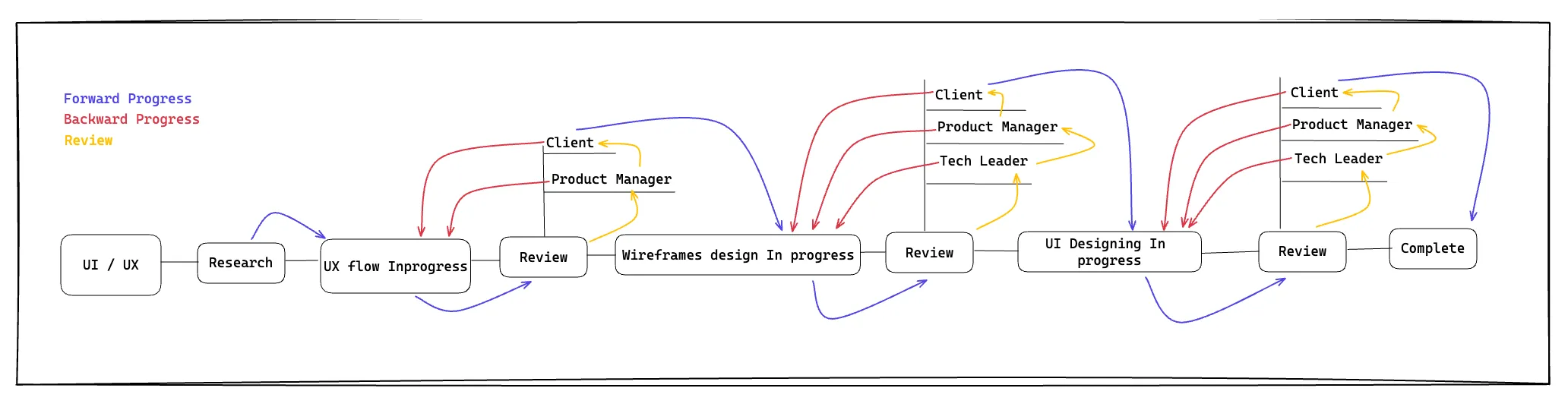
Here is a breakdown of what exactly needs to be reviewed (and what shouldn’t) at each review step.
- UX Flow: the UX flow itself. Not that there is anything else to review…
- Wireframes: arguably the most difficult review step (for the client especially). The focus of the review must be the User Experience exclusively
Design/UI: the focus during UI review is on the visual appeal and the feel of the product.
Commenting
The commenting phase for both UX and UI is critical. It is where the client can share their opinions and point out aspects that are incorrect, unadapted, or simply not to their liking.
However, if not properly regulated, the commenting phase can become messy and a source of frustration for designers.
What Not to Do:
- Introducing new ideas (this should be done via the proper channels).
- Sharing content.
- Asking for changes in the scope of the project.
The Purpose of the Commenting Phase:
- Identify mistakes (forgotten elements, typos, flaws in the UX, etc.).
- Point out details that aren’t right (for whatever reason).
- Express opinions on typography and colors (during the UI phase only).
Who Should Comment
Client
To maintain focus and consistency, only one person from the client-side should be designated as the commenter. Multiple commenters often lead to confusion and contradictory feedback. Moreover, it can initiate debates within the client’s team that are better handled internally and not on the Figma platform.
Having more than one commenter on the client team invariably creates bottlenecks, slowing down the iteration process and leading to frustration for the designers.
Crispr Coders
- The Team Lead: Particularly during technical reviews of the UX/UI, offering insights and ensuring alignment with project objectives.
- The Product Manager: Providing feedback after the technical review, focusing on the product’s alignment with user requirements and business goals.
- Optionally, Another Team Member: For a second opinion and to conduct a typos check, ensuring accuracy and consistency in the design.
Actionable vs. Non-actionable Comment
When providing feedback, it’s crucial to ensure that comments are actionable and useful. This helps minimize unnecessary back-and-forth between the client and the designer, streamlining the process and reducing frustration.
Non-actionable Comment Example:
“A non-actionable comment is vague, without opinions or explanations when necessary, and generally doesn’t give any real indication as to how to fix the problem.
Example:
I don’t like this.
This comment gives no information whatsoever about the reasons why the commenter doesn’t like it or what would be a better alternative.”
Actionable Comment Example:
An actionable comment is straight to the point, accurate, detailed, and gives concrete data/examples when possible.
Example:
This button has a different color than all other buttons in the UI. We should keep buttons consistent and have them all of the same green color.
This comment is clear and detailed. The designer doesn’t have to second-guess what it means or ask simple questions to the client.
Processing Comments
Once the designer understands a comment and implements the necessary changes in the design, they must provide a response indicating that the issue has been addressed. This response is typically labeled as “Fixed.”
Subsequently, either the Team Lead or the Product Manager (depending on who left the original comment) is responsible for reviewing the changes. If the changes are satisfactory, the comment should be marked as “Resolved” in Figma.
This systematic approach ensures that feedback is acknowledged, acted upon, and properly closed out, contributing to a streamlined and efficient design review process.
Dealing with Non-actionable Comments
When faced with a non-actionable comment from a client, it’s important to approach the situation calmly and methodically. Here are three initial steps to follow:
- Take a deep breath: Allow yourself a moment to compose your thoughts and emotions.
- Step away for a minute: Distance yourself from the comment to gain perspective.
- Come back and reread the comment: Review the comment with a fresh mindset.
Only after completing these steps should you proceed to address the comment. Here’s a suggested approach:
- Read between the lines: Try to understand the underlying issue, if possible.
- Reply back politely: Explain why the comment is not actionable and provide guidance on how to make it actionable.
- Ask guiding questions: Prompt the stakeholder to provide specific and detailed feedback. For example:
- “Which element exactly are you referring to?"
- "What part exactly do you not like?"
- "If you feel that this is too small/big, how much bigger/smaller do you think it should be? 2 times bigger/smaller? 3 times?”
- Etc.
The goal is to encourage the client to be precise and clear in their feedback. Here’s an example of a good reply:
“Thank you for your comment. To address this effectively, could you please specify which element you’re referring to? Additionally, if you have any suggestions on how we can improve it, we’d greatly appreciate your input. Your detailed feedback will help us ensure that we’re meeting your expectations accurately.”
This approach fosters constructive dialogue and helps align expectations between the client and the design team.